Open Graph images with Astro and Typst
Links to blog articles look better when they’re accompanied by an image.
If the HTML head has a meta tag like this, it will happen automatically:
<meta
  property="og:image"
  content="https://eaj.no/posts/graph-images-with-typst/og.png"
/>
My previous, tedious workflow for these kinds of images was to go to unspash.com, search for something like structure or archive, and then select an image I thought would fit the theme of the post. Being both boring and error-prone, I abandonded that process and set up a pipeline that generates image cards at build-time instead. They look like this:

Let me show you how I did it.
Typst
Typst is a tool that generates high-quality documents from a simple markup language. A lovechild of LaTeX and Markdown, it works great for math whilst also keeping the day-to-day text formatting syntax bearable. As a small taste, this snippet (adapted from the Typst README)
#set page(width: 10cm, height: auto, margin: 1cm)
#set heading(numbering: "I.")

#let fib_1 = 1
#let fib_2 = 1

= The Fibonacci sequence
The Fibonacci sequence is defined through the
recurrence relation $F_n = F_(n-1) + F_(n-2)$,
with $F_1 = #fib_1$ and $F_2 = #fib_2$.
It can also be expressed in _closed form:_

$
  F_n = round(1 / sqrt(5) phi.alt^n), quad
  phi.alt = (1 + sqrt(5)) / 2.
$
produces this fine document:
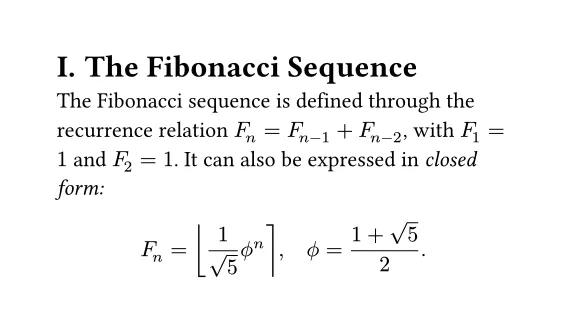
By default the typst CLI will create a PDF, but it can also make PNGs. The above image was created with the command
typst compile \
    --format png \
    --ppi 250 \
    typst-example.typ
But if you’d rather create something with a bit more pizzazz, by all means. How about
#set page(width: 1200pt, height: 630pt, margin: 80pt, fill: rgb("#FF1493"))
#set text(font: "Comic Sans MS", fill: white, lang: "no")


#grid(
  rows: (1fr, auto),
  align(left + horizon, {
    text(size: 72pt, weight: 800, "Typst very nice")
  }),
  text(size: 24pt, "Would typst again"),
)
which yields

Fantastic.
If all of my posts were titled “Typst very nice”, we’d be done, but, alas.
Luckily, typst accepts inputs to a document with --input key=value,
which is put in a sys.inputs dictionary for the template to read.
So the template becomes
#set page(width: 1200pt, height: 630pt, margin: 80pt, fill: rgb("#FF1493"))
#set text(font: "Comic Sans MS", fill: white, lang: "no")

#let title = sys.inputs.at("title", default: "You forgot the title :(")
// Reading the input here ☝️

#grid(
  rows: (1fr, auto),
  align(left + horizon, {
    text(
      size: if title.len() > 70 { 60pt } else { 72pt },
      weight: 800,
      title,
    )
  }),
  text(size: 24pt, "Would typst again"),
)
which, when rendered with
typst compile \
    --format png \
    --ppi 144 \
    --input title="Look ma, from the CLI!" fancy-typst-with-input.typ
becomes

Perfection.
Let’s move on to generating the images at build-time.
Astro
This site is built with Astro, a static site generator. Articles are written in Markdown, which is then bundled into a Content Collection by Astro. The details are irrelevant, what matters is that this lets me define metadata which I can query through a Javascript API.
The source code for the page template is at src/pages/posts/[id].astro.
There are a few notable things about this file path:
- That it is in the
src/pages/directory tells Astro that this should be rendered as a page. - The remainder of the path,
/posts/[id], tells Astro where to put the page. [id]being in brackets meansidis a dynamic parameter which must be defined at build time.
In other words, Astro needs to know every ID when building the site—it can’t generate infinitely many
IDs. A function called getStaticPaths exported from the template defines the set:
import type { GetStaticPathsResult } from "astro";
import { getCollection } from "astro:content";

export async function getStaticPaths(): Promise<GetStaticPathsResult> {
  const posts = await getCollection("posts");
  return posts.map((post) => ({
    params: { id: post.id },
    props: { post },
  }));
}
That is, fetch every article, and use its id as the id parameter.
This is the object returned for the current page:
{
  params: { id: "open-graph-images-with-typst" },
  props: { post: {
    /* Everything the template needs to render a post */
  }}
}
By default Astro will generate an HTML file, but it can also return other
kinds of responses. Together with this blog post I also put
the following snippet at src/pages/api/build-info.json.ts:
import type { APIRoute } from "astro";

export const GET = (async () => {
  const data = await getLatestJjMetadata();
  return new Response(JSON.stringify(data), {
    headers: { "content-type": "application/json" },
  });
}) satisfies APIRoute;

async function getLatestJjMetadata(): Promise<{
  changeId: string;
  committedAt: Date;
}> {
  // Implementation cut for brevity
}
Note that there are no parameters in brackets, so this will create a single JSON file at build time:
❯ tree dist/api
dist/api
└── build-info.json
And just like that, this blog now has a JSON api.
Note that the file extension is included in the path, i.e. .json.ts. This is
because when the dev server is running it sets the appropriate content-type header
to let the browser know what to do with the response, but once the page is built
the result is a file with .ts stripped off. The browser
then interprets the remaining file extension to know what content to expect at the path.
You probably see where this is going: Create an API route which takes a post ID
as a parameter and ends in .png.ts, gets the post title using the Astro Content Collection API,
generates an image, and returns it in a response with the appropriate content-type header.
You got it. Here’s the open graph image endpoint in its entirety, defined at
src/pages/posts/[id]/og.png.ts:
import type { APIRoute, GetStaticPaths, InferGetStaticPropsType } from "astro";
import { getCollection } from "astro:content";
import { execFile } from "node:child_process";
import { promisify } from "node:util";

import { OPEN_GRAPH_TEMPLATE_PATH } from "@/utils";

const execFileAsync = promisify(execFile);

export const getStaticPaths = (async () => {
  const posts = await getCollection("posts");
  return posts.map((post) => ({
    params: { id: post.id },
    props: { title: post.data.title },
  }));
}) satisfies GetStaticPaths;

type Props = InferGetStaticPropsType<typeof getStaticPaths>;

export const GET = (async ({ props }) => {
  const { stdout } = await execFileAsync(
    "typst",
    [
      "compile",
      OPEN_GRAPH_TEMPLATE_PATH,
      "-",
      "--format",
      "png",
      "--ppi",
      "144",
      "--input",
      `title=${props.title}`,
    ],
    { encoding: "buffer" },
  );
  return new Response(new Uint8Array(stdout), {
    headers: { "content-type": "image/png" },
  });
}) satisfies APIRoute<Props>;
Now go to eaj.no/posts/open-graph-images-with-typst/og.png, et voilà:
Extra credit: Cache busting
When a sharing platform loads the image for an article, it might very well be cached for a long time. Even if you decide to completely redo your entire branding, LinkedIn might insist on displaying your previous hideous design unless you handle it. A simple trick is to use a throwaway search parameter that doesn’t do anything other than make the URL unique:
/some-image.png?v=whateverA straightforward (but silly) solution for creating this parameter is to generate a random string of characters every time the site is built, ensuring your image is always fetched anew. I landed on using a hash of the typst template and the title, so that the cache key only changes whenever the actual content does:
import { createHash } from "node:crypto";
import { readFileSync } from "node:fs";

export function openGraphImageCacheBuster(title: string): string {
  const template = readFileSync(OPEN_GRAPH_TEMPLATE_PATH);
  return createHash("sha256")
    .update(template)
    .update(title)
    .digest("hex")
    .slice(0, 10);
}